Advantages of having Master Calendar in every application is to avoid multiple date fields from Fact Tables.
Attaching the file with common code used., master-calendar.

Advantages of having Master Calendar in every application is to avoid multiple date fields from Fact Tables.
Attaching the file with common code used., master-calendar.
What ever selection done in an qlikview application, they show up in current selections box. However, there might be scenario’s where some fields should not show up. In such situations, we can use system variable named HidePrefix.
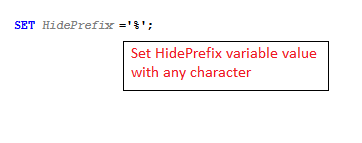
HidePrefix variable is to be set in script editor as shown below:
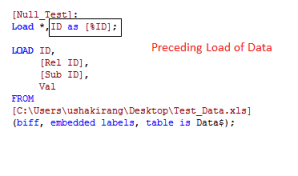
Later append to column names as a preceding load as shown below:
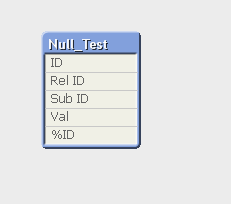
Data Model looks like below:
Internal Table View is the default option and shows how the data is stored in QlikView. If synthetic keys are created, they are shown in this view.

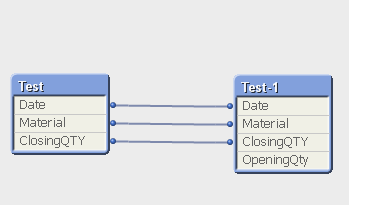
Source Table View shows how QlikView reads the data, and when synthetic keys are present in the model they are not shown in this view. Instead, multiple connectors between tables are displayed.
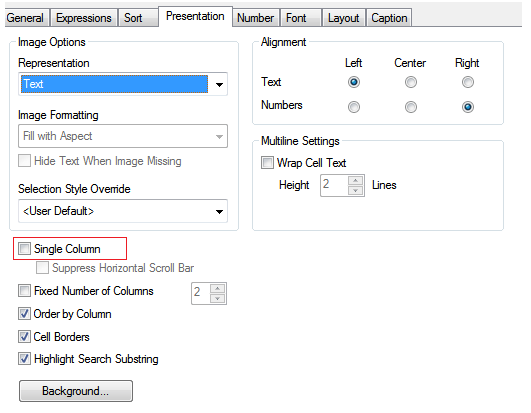
When ever we drag a list box in qlikview application it is always shown in vertical form. There is a property to be set for horizontal alignment in list box through which we can achieve the required functionality as shown below uncheck ‘Single column’ check box:
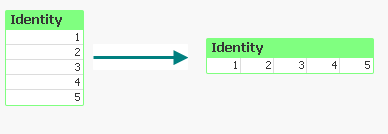
We can see the output vertical list box converted to horizontal list box :
There might be a confusion caused among the developers when they applied some condition to hide a Qlikview sheet object, but the object appears on the sheet.
There is a option in ‘Document Properties’ which is to be unchecked as highlighted below:
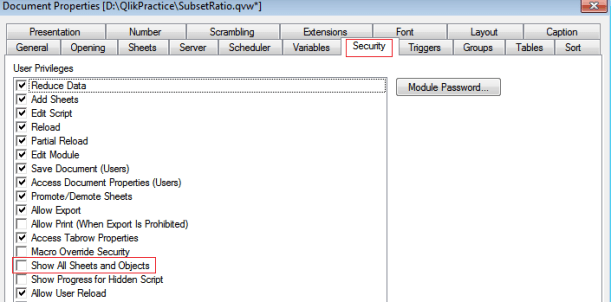
Once ‘Show All Sheets and Objects’ is unchecked, the condition works fine.
 Qlikview